I tried creating a new view, just like we do on our old desktop environment. The way to create views is very different, and cannot find a way to add grouping levels to create virtual folders within the view.
Thanks
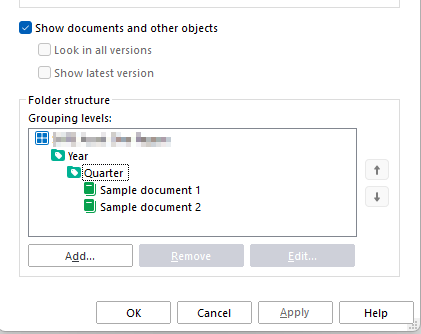
I tried creating a new view, just like we do on our old desktop environment. The way to create views is very different, and cannot find a way to add grouping levels to create virtual folders within the view.
Thanks

Grouping levels can be added from the view settings under the three-dot menu.
Refer to the user guide for more information: Creating, Editing, and Deleting Views
Make sure you're using the latest version of M-Files, as numerous improvements have been introduced in this area over the past year.
Joonas Linkola - might be worth updating the documentation on the link you provided - the "Edit view" button is hidden by default behind the expand view details button - took me a while to find that!
What I can't work out is how you change a virtual folder into a view (in old desktop you would right click the virtual folder and choose "customise" which would turn it into a view, what's the equivalent here??)
Thanks for raising the user guide issue, I've notified our documentation team.
Virtual folder customization hasn't been implemented yet in the new client, as it's a relatively rarely used feature overall. Our product team will continue working on the remaining value‑parity items throughout the year, but there's no confirmed timeline for this particular one.
Thanks for raising the user guide issue, I've notified our documentation team.
Virtual folder customization hasn't been implemented yet in the new client, as it's a relatively rarely used feature overall. Our product team will continue working on the remaining value‑parity items throughout the year, but there's no confirmed timeline for this particular one.
© 2025 M-Files, All Rights Reserved.