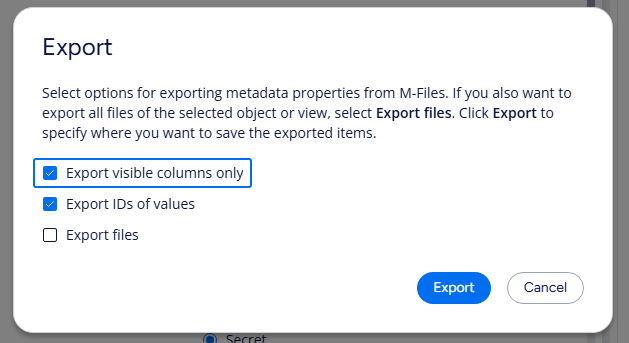
The option to only export visible columns i a view is no longer available. See screen shot. Today all available metadata will be visible in the export, which for us are over 700 columns. Is this a bug or something that is lacking in NEW M-Files?

It seems like a misfunction, I did a quick test and I have the option available in both M-Files Web and the new M-Files Desktop. I'm using the latest version (March '26 release).

It would be good to first ensure you are running the latest client version. If the option still doesn't appear, please reach out to M-Files Support for investigation.
Strange. Unfortunately I have the lastest March-2026 version. I will create a ticket for our M-Files support.
FYI when changing to the old M-Files the option to show visible columns exists but is grey (not ticked).

Since you are already on the latest client, you could also test if the behavior is the same in other views. This would be useful information for the support team: is the option unavailable only in this specific view or in all views.
Thank you for the tip. FYI It works the same for all different kinds of views. (personal, common ets)
© 2025 M-Files, All Rights Reserved.