This discussion has been locked.
You can no longer post new replies to this discussion. If you have a question you can start a new discussion

Creating a Web URL link with new M-FIles Version

In the previous Web version, the 'Get M-Files Web' option was available.
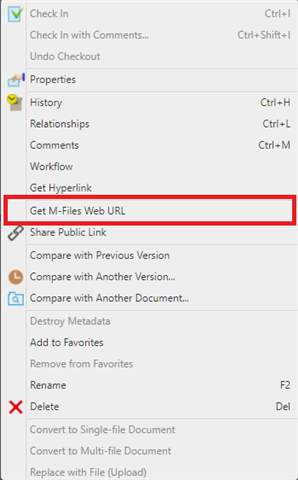
On V24, the 'Get M-Files Web URL' option is not available.
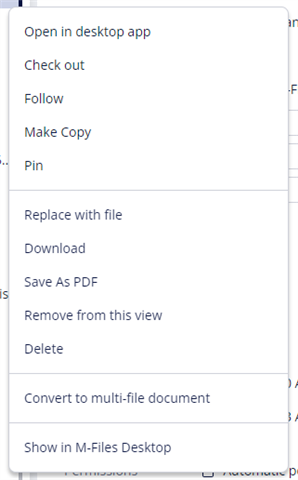
Is there any way to produce the Web URL as before?

I looked at this reference, and I do not see how to. M-Files URL properties

The format for the web URL in the previous version was: https://website.com/link.ashx?Action=download........  I used this link and adding &showopendialog=0 at the end as a direct link to our documents, resulting in the document displaying in a web browser without any M-files banner after clicking on a link.

Because of this, I have several links in several documents that do not work.  

Please advise.

Parents
  • The new "universal" link format is described in Configuring M-Files Links. These M-Files links do not yet support all the link actions that were previously available for the classic M-Files Web but this value parity is one of the focus areas for our product team this year.

    In the M-Files Web interface, you can copy the link to the object or view from the listing area.

    If you have existing links for the classic M-Files Web in some documents and have ended the use of the classic web client, you can set up redirects for these links. This is done under Advanced Vault Settings > Client > Web and New Desktop > Disable Classic M-Files Web and Redirect Links to M-Files Web in cloud environments. In on-premises environments, refer to the user guide: Enabling or Disabling the Classic M-Files Web on On-Premises Servers

Reply
  • The new "universal" link format is described in Configuring M-Files Links. These M-Files links do not yet support all the link actions that were previously available for the classic M-Files Web but this value parity is one of the focus areas for our product team this year.

    In the M-Files Web interface, you can copy the link to the object or view from the listing area.

    If you have existing links for the classic M-Files Web in some documents and have ended the use of the classic web client, you can set up redirects for these links. This is done under Advanced Vault Settings > Client > Web and New Desktop > Disable Classic M-Files Web and Redirect Links to M-Files Web in cloud environments. In on-premises environments, refer to the user guide: Enabling or Disabling the Classic M-Files Web on On-Premises Servers

Children