Dynamic multi-select value list handling in M-Files Word templates

Hi everyone,


I have a multi-select value list property inserted into a Word template using the “Insert Property” function. I understand that for a multi-select property Word generates separate DOCPROPERTY fields for each selected value (like Job title #1, Job title #2, …) and you can manually replicate them by incrementing the suffix (n1, n2, etc.) in the field code.

 However, in my case the number of selected values isn’t fixed — it can vary from 1 up to N values. I need a way to automatically display all selected multi-select values in Word, without pre-defining a fixed number of fields in the template.

 I’ve read the blog explanation about manually duplicating field codes (e.g. n1, n2, etc.) to get values, but that doesn’t scale when the number of values is dynamic.

 Thanks in advance for any guidance or examples applicable to both on-premises and cloud vaults.

Parents
  • We had this issue in the past and trying to copy the code inside the template is time-consuming and complicated, and also you have to insert additional lines and columns into the template to accommodate these when you don't know how many there ever will be. This is fine if the number of values is always capped at a maximum (for example, in some Requests, we have a limit on listing a maximum of three employees, so this is doable).

    But, for example, in meeting reports, the number of participants is dynamic and always changing.


    Here was our solution: create a property (text multi-line) - in this case the property we created is called "List - EUAM Iraq".
    Calculate expression - "From EUAM" is the object type we list and then use ForEach - this will list each entry on a separate line - so there can be 1 or 100 entries - all will be listed on a separate line in the property ("MM Name" is the object Name/Title)
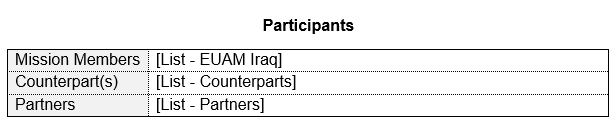
    We inserted the property "List - EUAM Iraq" into our template.
    These screenshots should demonstrate how this works:

    Property Calculation

    So in the template we inserted the property (as you can see we did this for other multi-value properties):

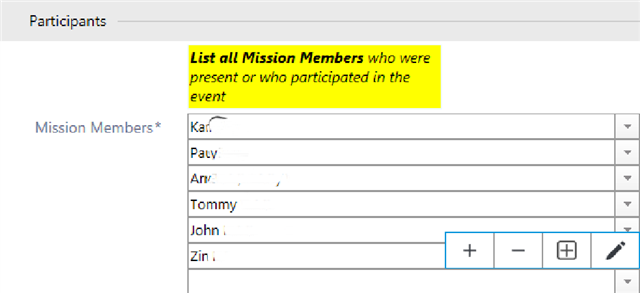
    When the report is created, the property lists all values on a separate line:

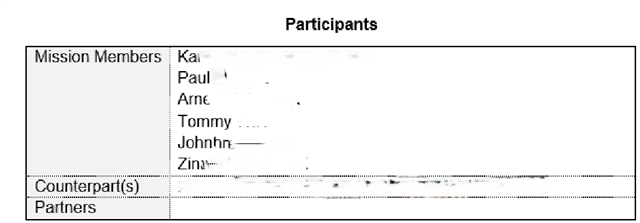
    Inside, in the template:

Reply
  • We had this issue in the past and trying to copy the code inside the template is time-consuming and complicated, and also you have to insert additional lines and columns into the template to accommodate these when you don't know how many there ever will be. This is fine if the number of values is always capped at a maximum (for example, in some Requests, we have a limit on listing a maximum of three employees, so this is doable).

    But, for example, in meeting reports, the number of participants is dynamic and always changing.


    Here was our solution: create a property (text multi-line) - in this case the property we created is called "List - EUAM Iraq".
    Calculate expression - "From EUAM" is the object type we list and then use ForEach - this will list each entry on a separate line - so there can be 1 or 100 entries - all will be listed on a separate line in the property ("MM Name" is the object Name/Title)
    We inserted the property "List - EUAM Iraq" into our template.
    These screenshots should demonstrate how this works:

    Property Calculation

    So in the template we inserted the property (as you can see we did this for other multi-value properties):

    When the report is created, the property lists all values on a separate line:

    Inside, in the template:

Children
No Data