Hidden metadata properties - how do I show these to external users?

Hi all,

I am currently trying to set up an external user to be able to access a certain view in order for them to be read only.  So far I have managed to:

  • Give them access to the overall view
  • Set their permissions to read only
  • Confirm that they are not able to check out any documents or delete or make amendments

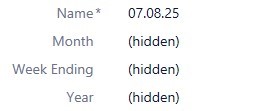
All good.  However, on the view, once the click down from the first level there is nothing on show.  When they look at another view of document by class they can see everything but three pieces of metadata are hidden - year, month and week ending.  These are the properties missing under the view which would show the structure.

I have checked all permissions, and everything looks good to allow an external viewer to see so what am I doing wrong?
Grateful for any assistance,

Graeme

Parents
  • Did you also check the permissions on the property definitions ? The ones you see as hidden probably has "all internal users" permission. Not "all internal and external users"

    If those are list properties, you can check permissions from list view in admin panel. There are permissions over there as well for you to configure permissions for spefic list entries

  • Hi CagriE,

    Thank you for coming back to me.  I did check those permissions as well and they have both an Internal User Permission and an Internal and External User' permission which may be causing the conflict.  I did set up a separate external user only grouping to see if that would prioritise but it didn't.

    We have the M-Files support team looking into this for us as it just doesn't make sense, hopefully they can figure it out quickly.

    Kind regards,
    Graeme

Reply
  • Hi CagriE,

    Thank you for coming back to me.  I did check those permissions as well and they have both an Internal User Permission and an Internal and External User' permission which may be causing the conflict.  I did set up a separate external user only grouping to see if that would prioritise but it didn't.

    We have the M-Files support team looking into this for us as it just doesn't make sense, hopefully they can figure it out quickly.

    Kind regards,
    Graeme

Children
No Data