Hidden metadata properties - how do I show these to external users?

Hi all,

I am currently trying to set up an external user to be able to access a certain view in order for them to be read only.  So far I have managed to:

  • Give them access to the overall view
  • Set their permissions to read only
  • Confirm that they are not able to check out any documents or delete or make amendments

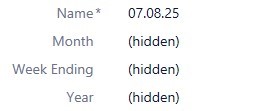
All good.  However, on the view, once the click down from the first level there is nothing on show.  When they look at another view of document by class they can see everything but three pieces of metadata are hidden - year, month and week ending.  These are the properties missing under the view which would show the structure.

I have checked all permissions, and everything looks good to allow an external viewer to see so what am I doing wrong?
Grateful for any assistance,

Graeme

Parents
  • To me it looks like permissions on the actual properties are correct, but permissions on the value list items themselves may be incorrect.

    For example...

    The Month property is probably driven from a Month value list.  Inside that value list are items, one for each month.  Each of these value lists has an ID (which is used to locate the item) and a display value for the name.  Each item also has a permission set, and I suspect that the permission set does not include external users.

    My reasoning for this is that you can physically see "Month" on the metadata card, so you can access the property definition.  You can also see that there's a value, but it is failing to retrieve the name which is why you see "hidden".

    Check Month to start.  If this is the root cause then you need to alter all the items in the value lists so that external users can see them, then configure it such that new items get the correct permissions too (I don't suspect that the Month value list will change much, but you might add new Years in the future!).

  • Hi Craig, absolutely brilliant!  

    We had certainly gone through all of the property fields and values but not the actual contents of the value lists but I can confirm that I have done that and the external user now has the access required. 

    Thank you so very much!  

    Kind regards,
    Graeme

Reply Children
  • It's a rabbit hole sometimes, so I'm glad you got it fixed.

    Generally: every "thing" in M-Files has a permission set.  Value list items, whilst just typically a name, are also a "thing", just like objects themselves.  And, as with objects, you can set permissions on them to see who can see them; by default that's internal users, not external.

    It's something that you generally trip over once and then make a mental note to check for in the future.  Remember this when you create new value lists, for example. Wink