This discussion has been locked.
You can no longer post new replies to this discussion. If you have a question you can start a new discussion

Can't connect an azure storage ressource as an external source?

Hi there

Am trying to connect/map an Azure SMB file share as an external source, however, for some reason I can't get that to work.
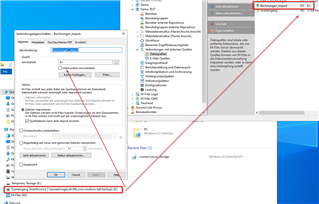
The share itself has been created according to https://learn.microsoft.com/en-us/azure/storage/files/storage-files-quick-create-use-windows and been mounted to a Azure VM running M-Files

While I can access the particular network share through Windows Explorer without any problems and create, edit and delete whatever files, when mapping and refreshing the connection within M-Files Admin the following error appears:
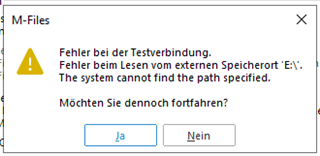
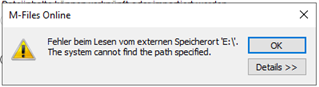
PropertyPageExtLocGeneral.cpp, 718, Fehler beim Lesen vom externen Speicherort 'E:\'. (0x800400A1)
Item_ExternalLocation.cpp, 630, Fehler beim Lesen vom externen Speicherort 'E:\'. (0x800400A1)
RPCMethodCallWithRetry.h, 177, Fehler beim Lesen vom externen Speicherort 'E:\'. (0x800400A1)
RPCExternalLocationsAdmin.cpp, 848, Fehler beim Lesen vom externen Speicherort 'E:\'. (0x800400A1)
RPCExternalLocationsAdmin.cpp, 276, Fehler beim Lesen vom externen Speicherort 'E:\'. (0x800400A1)
RPCExternalLocationsHelper.cpp, 1735, Fehler beim Lesen vom externen Speicherort 'E:\'. (0x800400A1)
RPCExternalLocationsHelper.cpp, 1735, The system cannot find the path specified. (0x80070003)
RPCExternalLocationsHelper.cpp, 1784, The system cannot find the path specified. (0x80070003)
FileHelper.cpp, 733, The system cannot find the path specified. (0x80070003)
(M-Files 23.4.12528.8 2023-05-14T22:44:43.332Z)

The closest thing I came by in the forum was https://m-files.my.site.com/s/article/Unable-to-Connect-to-Azure-Network-File-Share, however, can only partially relate to the suggestions mentioned therein.

Any ideas what I'm missing here?

Best regards

Guido

Parents
  • I haven't tried this myself but found these steps to using Azure File Share as an external file source. It seems you shouldn't use a mounted drive but connect directly to the file share.

    1. In Microsoft Azure Portal, create a new Storage account (if needed)
    2. In Microsoft Azure Storage Explorer, create a new File Share (if needed)
    3. In M-Files Admin, create a new external File Source (requires system administrator user)
      • "Path from the server:" must be the UNC path of your File Share, for example \\mytestaccount.file.core.windows.net\externalsource
      • Use "Set Account" to add the details of your Storage account.
        • "This account": must be the name of your Storage account, for example mytestaccount
        • "Password:" must be the Primary Key of your Storage account
    4. This is the minimum setup to get Azure File Share to work. You can test the connection by pressing "Apply". Set other settings as needed and save the configuration by pressing "OK".
  • Hey Joonas,

    Thanks a lot for your valuable input and enlightenment. Your suggestion worked spot on and I was finally able to hook up to the Azure file share like a charm :-)

    My mistake was obviously the "pre-mapping" to a local drive/path, which does work for whatever file transactions within Windows but not for M-Files.

    Cheers,
    Guido

Reply
  • Hey Joonas,

    Thanks a lot for your valuable input and enlightenment. Your suggestion worked spot on and I was finally able to hook up to the Azure file share like a charm :-)

    My mistake was obviously the "pre-mapping" to a local drive/path, which does work for whatever file transactions within Windows but not for M-Files.

    Cheers,
    Guido

Children
No Data