This discussion has been locked.
You can no longer post new replies to this discussion. If you have a question you can start a new discussion

User cannot check-out even though he has Edit rights

Hi,

So as the title says, I have 2 users now who cannot check-out/edit metadata a document even though if you check the permissions tab, it says that he has the Edit rights.

Another interesting bit is, after I as administrator check-out check-in the document, then he can Edit as normal. I'm guessing something doesn't refresh in the background? These are not newly created documents either, 2 weeks+ old.

Also, whenever a change happens on the document the Modified By field displays it as (M-Files Server) not the user

Any ideas what could be causing this weird problem?

Thanks, Žan

Parents Reply Children
  • Edit 1 hour after comment:

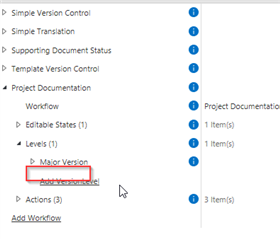
    I actually solved it now, without touching the VBScript though. I just removed the Minor Version level in the workflow configuration of Version Control Lite

    Hi! Thank you for the link, I've tried many things but due to my limited VBScript knowledge I didn't solve anything yet.

    I've found that the culprit is the property "Minor Version", which increments by 1 whenever a document is in the Editable State (version control lite). This started ha

    Below is the code set for Minor Version (the code is in the property itself and not in the workflow).

    Logic here is that Major Version increments by 1 whenever the document is Released, and Minor increments when editing in Editable State. Major Version however does not have any VBScript. 

    Option Explicit

    ' Set minor version on checkin

    ' Get Minor Version Value
    Dim minorVerValue
    minorVerValue = PropertyValues.SearchForProperty(PropertyDef.ID).TypedValue.DisplayValue

    ' Get current logged in user
    ' Dim currentUser = Vault.CurrentLoggedInUserID

    ' if document is in state "In preparation" and User is current user and version is > 1
    If (PropertyValues.SearchForProperty(39).TypedValue.GetLookupID = 422 or PropertyValues.SearchForProperty(39).TypedValue.GetLookupID = 405) and CurrentUserID <> -102 and ObjVer.Version > 1 Then

    ' Increment Minor Version by 1
    Dim nextMinorVersion
    nextMinorVersion = minorVerValue + 1

    ' Set minor version property
    Output = nextMinorVersion
    End If