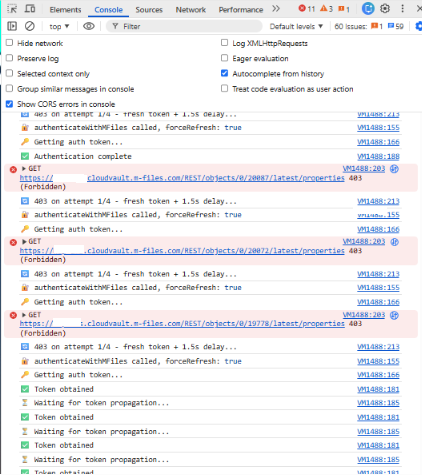
API -> Upload files via custom widget and if the file upload hits the 403 error sometimes

Hello,

We have an api function in hubshare custom widget to link a person object to hub. It worked in POC (on-premise vault), but not in M-Files cloudvault (we have tried using retry to get through the 403 error on multi cloud server authentication problem.

We have tried sending cookies as per the article suggestion support.m-files.com/.../REST-API-and-Multi-Server-Mode-Session-management, but it's still not working (having a lot of 403s).

· Please see the attached screenshots:
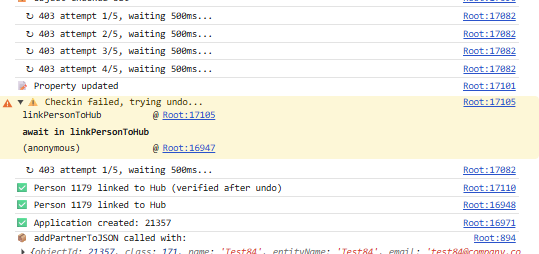
Please suggest me any other solution for fix the 403 error's. Thanks!

Regards,

Senthil

Parents
  • I've updated the full http response. Could you please check and share your inputs.

  • Firstly: this is a peer-to-peer support forum.  If you post a message or a reply then there is no SLA on when you get a response.  It is not good etiquette to chance for one immediately after you post something; someone will reply when they get a chance to do so.  If you need an SLA then you can, of course, contact your partner manager or account manager for alternate, paid, consultancy options.

    Secondly: I don't see what I asked for.

    Thirdly: I will now be away from the office for a couple of days, so please do not have any expectations that I will - personally - respond to any further messages for the next week or so.  If you can provide answers to the actual question then hopefully someone else can help.

  • Please find the latest update from our  customer. 

    *********

    With a view to suggest some possible way outs, here are some questions to M files - 


    We’re experiencing intermittent 403s on our CloudVault REST API calls (vault: 2932A6E4-F087-4342-8544-4997AE128E84), particularly during checkout → PUT → checkin sequences.

    Can you please confirm:

    1. Are auth tokens vault-scoped or node-scoped in our setup?

    2. Is ARR sticky session / node affinity enabled?

    3. How many backend nodes is our vault distributed across? 


    A possible solution -  

    When M-Files responds to your first auth request, it likely sets an ARRAffinity cookie in the response headers. If you capture that and send it back on every subsequent request, IIS pins all your calls to the same node — no more 403s, no retries, no waits.


    Try this in your authenticateWithMFiles:

    let authToken = null;

    let affinityCookie = null;


    async function authenticateWithMFiles(forceRefresh = false) {

      if (!forceRefresh && authToken && tokenExpiry && Date.now() < tokenExpiry) return authToken;

      const resp = await fetch(`${MFILES.baseUrl}server/authenticationtokens`, {

        method: 'POST',

        headers: { 'Content-Type': 'application/json' },

        body: JSON.stringify({ Username: MFILES.username, Password: MFILES.password, VaultGuid: MFILES.vaultGuid })

      });

      // Capture affinity cookie

      const cookie = resp.headers.get('set-cookie');

      if (cookie) affinityCookie = cookie.split(';')[0];

      const data = await resp.json();

      authToken = data.Value;

      tokenExpiry = Date.now() + 25 * 60 * 1000;

      return authToken;

    }


    Then in mfilesRequest, add the cookie to every call


    headers: {

      'Content-Type': 'application/json',

      'X-Authentication': authToken,

      ...(affinityCookie && { 'Cookie': affinityCookie }),

      ...options.headers

    }


    Caveat: Browser fetch() blocks reading set-cookie headers cross-origin (CORS). This will only work if M-Files CORS config allows it — worth testing first in the console with resp.headers.get('set-cookie') to see if you get anything back. 


    I have checked my Chrome browser - it's null.


    So, a question to M files - is it something that can be done in CORS setting? 

  • That looks like an AI-generated answer based on this article: Authenticating to the M-Files Web Service (REST API)

    I ask again: what is the full HTTP response in this situation?

  •     Customer askes us , is that apart from copying from Console, what do we need to send you?

    Could you please share us some screenshot of reference for caputing the Full Http Response. Thanks!

    Regards,

    Senthil

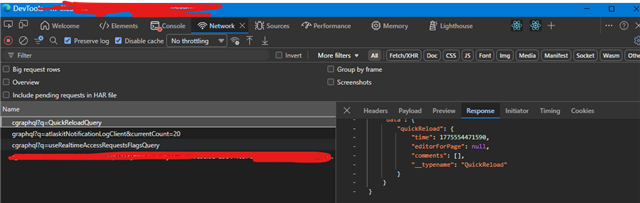
  • Use the network tab inside browser tools to get the HTTP response, or use a HTTP debugging proxy like Telerik Fiddler.

  • The .har files do not contain the actual response content.

    Open the browser tools, find a 403 request, click it, then select the "Response" tab.

  • Please find the below full http response.

    ***************

    {

        "Status": 403,

        "URL": "/objects/0/21368/latest/properties",

        "Method": "GET",

        "Exception": {

            "Name": "ForbiddenException",

            "Message": "Token-based authentication failed.",

            "InnerException": {

                "Name": "CryptographicException",

                "Message": "Error occurred while decoding OAEP padding.",

                "StackText": ""

            }

        },

        "Stack": "",

        "Message": "Token-based authentication failed.",

        "IsLoggedToVault": false,

        "IsLoggedToApplication": false,

        "ExceptionName": "ForbiddenException"

    }


    {

        "Status": 403,

        "URL": "/files",

        "Method": "POST",

        "Exception": {

            "Name": "ForbiddenException",

            "Message": "Token-based authentication failed.",

            "InnerException": {

                "Name": "CryptographicException",

                "Message": "Error occurred while decoding OAEP padding.",

                "StackText": ""

            }

        },

        "Stack": "",

        "Message": "Token-based authentication failed.",

        "IsLoggedToVault": false,

        "IsLoggedToApplication": false,

        "ExceptionName": "ForbiddenException"

    }


    {

        "Status": 403,

        "URL": "/objects/0/18037/latest/properties",

        "Method": "GET",

        "Exception": {

            "Name": "ForbiddenException",

            "Message": "Token-based authentication failed.",

            "InnerException": {

                "Name": "CryptographicException",

                "Message": "Error occurred while decoding OAEP padding.",

                "StackText": ""

            }

        },

        "Stack": "",

        "Message": "Token-based authentication failed.",

        "IsLoggedToVault": false,

        "IsLoggedToApplication": false,

        "ExceptionName": "ForbiddenException"

    }


    {

        "Status": 403,

        "URL": "/objects/0/18037/12903/properties",

        "Method": "PUT",

        "Exception": {

            "Name": "ForbiddenException",

            "Message": "Token-based authentication failed.",

            "InnerException": {

                "Name": "CryptographicException",

                "Message": "Error occurred while decoding OAEP padding.",

                "StackText": ""

            }

        },

        "Stack": "",

        "Message": "Token-based authentication failed.",

        "IsLoggedToVault": false,

        "IsLoggedToApplication": false,

        "ExceptionName": "ForbiddenException"

    }

  • This error is exactly the error listed in the article.  The session ID is not being sent properly, so the request is being routed to a different server.  You need to go back and check your implementation for that.

    You may be right that the browser does not support reading/setting cookie headers in cross-origin situations (I don't know, but you could well be right).  Debugging what's happening in those situations (i.e. does it actually work?) would be good.

    If you cannot set these then I think you have three options:

    1. Avoid using these style authentication tokens.  You can send credentials via headers, for example.  Maybe not great, but it looks like you probably already have these stored client-side anyway so it's probably not materially more insecure than you already have.

    2. Use something server-side, rather than client-side, to interact with the API.  This means creating some middleware instead, but it would resolve the CORS issues.

    3. Speak to M-Files support about whether the CORS changes you need can be configured or not.  I haven't encountered this before so I don't know what those CORS changes might need to be.

Reply
  • This error is exactly the error listed in the article.  The session ID is not being sent properly, so the request is being routed to a different server.  You need to go back and check your implementation for that.

    You may be right that the browser does not support reading/setting cookie headers in cross-origin situations (I don't know, but you could well be right).  Debugging what's happening in those situations (i.e. does it actually work?) would be good.

    If you cannot set these then I think you have three options:

    1. Avoid using these style authentication tokens.  You can send credentials via headers, for example.  Maybe not great, but it looks like you probably already have these stored client-side anyway so it's probably not materially more insecure than you already have.

    2. Use something server-side, rather than client-side, to interact with the API.  This means creating some middleware instead, but it would resolve the CORS issues.

    3. Speak to M-Files support about whether the CORS changes you need can be configured or not.  I haven't encountered this before so I don't know what those CORS changes might need to be.

Children
No Data