This discussion has been locked.
You can no longer post new replies to this discussion. If you have a question you can start a new discussion

How to Get M-Files Built-in Properties, Classes, Object Types?

I'd like to get the properties, classes, object types that are present when a fresh new vault is added. What I see now is some enum like - MFBuiltInPropertyDef, MFBuiltInObjectType, MFBuiltInObjectClass. But in the newly crated vault, apart from those enum ids we see some other stuffs. 

How to get those built-in stuffs of newly created vault?

Parents
  • Can you give me an example of the sort of thing you mean? 

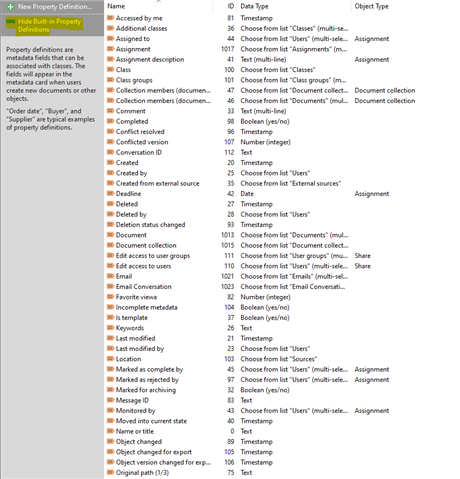
  • Sure. Here is an example for properties - 

    When the highlighted Hide Built-in property definition is clicked, only these properties are shown out of which Test is created by myself -


    I guess all the properties in first image except properties in second images, are built-in properties. Now I'd like to fetch all the properties that were shown in first image except the properties in second image. 

    I want the same behavior for classes, object types as well.

  • Which of these do not exist in the built-in enum though?

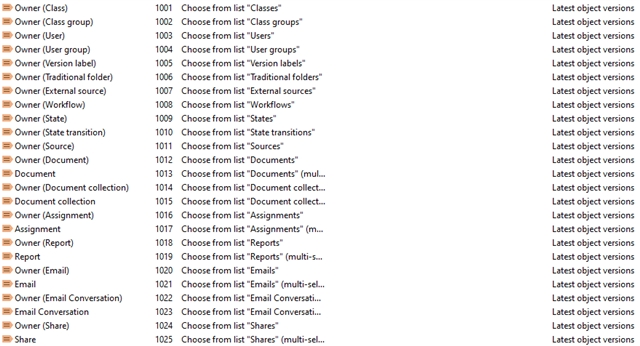
  • Like, for properties, these are not present in enum - 

    I see this are not shown if Hide Built-in property is being clicked. 

    One question popped up in my mind - Keywords and Name or title is showing even if Hide Built-in property is being clicked. 

  • Aha.

    So some of those properties are created automatically when you create object types and the like.  So they are "built in" in that they are not something you are expected to change, but they are not built-in in that they're available in all vaults all of the time.

    An example may be something like "Owner (Assignment)".  The ID for the object type Assignment is built-in and in the enum, but that property is generated when the vault is created and could theoretically be different in different vaults.  As a result if you wanted to get the ID of this you would load the Assignment object type and then read the "OwnerPropertyDef" property to find the runtime ID for this property.

  • And "name or title" is an odd one.  It is built-in but I suspect that it's simply so common that if we hid that property from the list then it'd cause some confusion amongst people so it's always shown (that's my assumption).

  • Thanks for the direction. Let me check if I can achieve what I want from this.

  • For Report in both Object Types and Classes though it's built-in (it is hidden when hide built-in classes, object types are clicked), it is not present in MFBuiltInObjectType, MFBuiltInObjectClass. 

    How to retrieve it as built-in object types and classes?

Reply
  • For Report in both Object Types and Classes though it's built-in (it is hidden when hide built-in classes, object types are clicked), it is not present in MFBuiltInObjectType, MFBuiltInObjectClass. 

    How to retrieve it as built-in object types and classes?

Children
  • You're finding all sorts of interesting ones!  I have found a tracker item related to report missing from MFBuiltInObjectType.  It was discarded about six years ago as "will not fix".  I don't have visibility of the reasoning.

    In my vault the report object type has an ID of 15.  As the ID for this is less than 100, I believe that this is static and will be the same in all vaults, so you can probably hard-code this if you need to reference it.  Certainly I've found some references inside our internal source code which hard-codes the value as 15.

  • Ah, thanks. In my vault it's 15 as well. For class it's -101. Can we consider this to be hard coded for built-in?

  • I would suspect so, yes, but my personal approach would be to load the appropriate classes from the API and use that to find the one which is marked as the default class for the object type.

    But, again, I tend to be overly cautious; with a negative class ID this should also be static.