


Hello,
I am currently working with the COM API of M-Files in C#, and I need to configure the connection to the M-Files server through an HTTP proxy.
My goal is to connect to an M-Files server (Document Vault) from a network where all outgoing traffic must go through a proxy.
Here is the client settings who is working :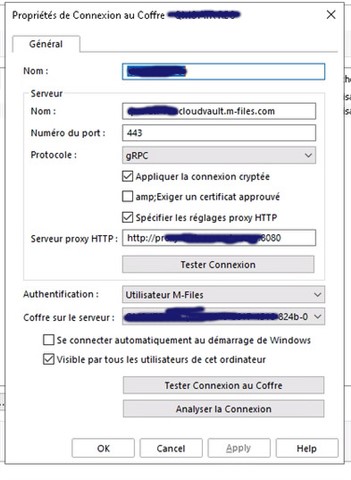
And here is my code :
public static MFilesServerApplication AppServer = new();
AppServer.Connect(type, appConfig.MFILES_USER, appConfig.MFILES_PASSWORD, "", appConfig.MFILES_PROTOCOL, appConfig.MFILES_HOST, appConfig.MFILES_PORT);
Vault = AppServer.LogInToVault(appConfig.MFILES_GUID);
My questions are:
-
Is it possible to configure proxy settings directly in the M-Files COM API?
-
If yes, how can I specify the proxy address, port, and optionally credentials?
-
If not, is the only option to rely on system-level proxy configuration (Windows proxy settings), or should I use a different approach (e.g., Web Service API instead of COM)?
I could not find clear documentation about proxy handling in the COM API.
Any guidance would be greatly appreciated.
Thank you!


