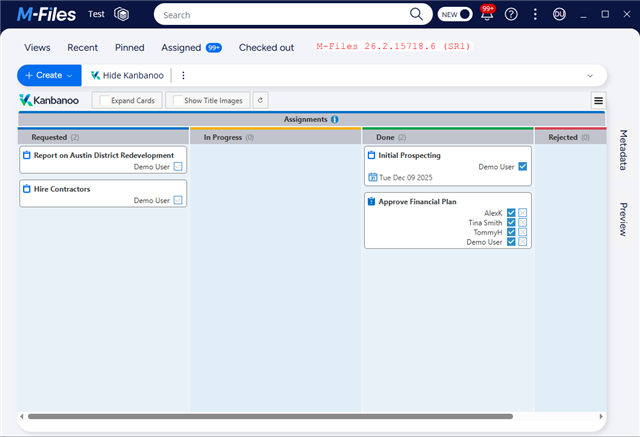
M-Files 26.2.15718.6 (SR1), new clients
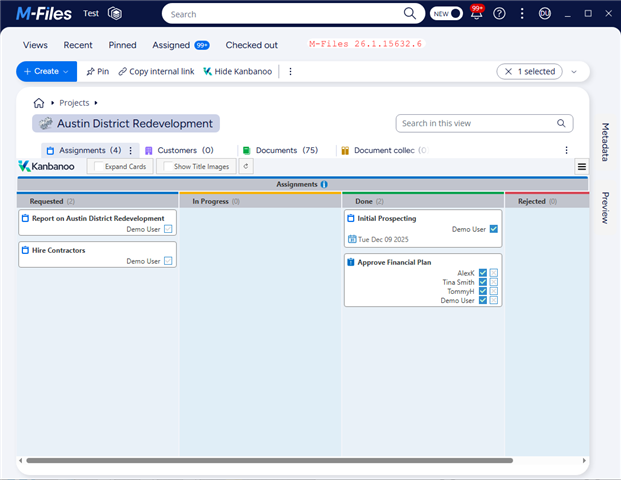
There is a change of behavior from M-Files 26.1 and earlier to M-Files 26.2 (SR1): In M-Files 26.2 when a listing dashboard is displayed the M-Files Workspace UI (including the name of the view) is hidden. In earlier versions of M-Files the M-Files UI did not change but the dashboard was displayed in the currently selected Workspaces tab. See screenshots.
In M-Files 26.2 SR1 the only way to recover the Workspace UI is to (programmatically) close the dashboard - if the developer of the dashboard gives a way to do it.
Although it gives more screen space to the dashboard I think this is confusing to users. There is no display of the current view and not every user may figure out how to get back to a Workspace UI by closing the dashboard.
Since there is no announcement of such a change in the Release Notes I suppose this is actually a bug, not intended behavior.
See attached screenshots for clarification
M-Files 26.1:
 .
.
Same Workspace in M-Files 26.2 SR1: