How can I develop applications using VAF?

Hello, I've developed an application using VAF on my own and added it to my library, but it's not working. Finding resources related to VAF is very limited. How can I improve my skills in this area? My current goal with the code is to automatically open a document based on the given class workflow and state. If I can achieve this, I'd like to create a system that automatically opens documents every day at 8:00 AM.
Vault Application.cs

using System;
using MFiles.VAF.Common;
using MFiles.VAF.Core;
using MFilesAPI;

namespace PersonelDenemeVAF
{
    public class VaultApplication : ConfigurableVaultApplicationBase<Configuration>
    {
        [MFConfiguration("PersonelDenemeVAF", "Configuration")]
        private Configuration config = new Configuration();

        /// <summary>
        /// Nesne check-in olduğunda tetiklenir.
        /// Konfigürasyondaki workflow ve state ile karşılaştırma yapılır.
        /// </summary>
        [EventHandler(MFEventHandlerType.MFEventHandlerAfterCheckInChanges)]
        public void AfterCheckIn(EventHandlerEnvironment env)
        {
            try
            {
                var obj = new ObjVerEx(env.Vault, env.ObjVer);

                // Eğer bu zaten otomatik oluşturulmuş sınıf ise işlemi atla (sonsuz döngü önleme)
                if (obj.Class == this.config.Class.ID)
                    return;

                // Workflow ve State property değerlerini oku
                var workflowProp = obj.GetProperty(MFBuiltInPropertyDef.MFBuiltInPropertyDefWorkflow);
                var stateProp = obj.GetProperty(MFBuiltInPropertyDef.MFBuiltInPropertyDefState);

                int currentWorkflowID = workflowProp?.TypedValue.GetLookupID() ?? -1;
                int currentStateID = stateProp?.TypedValue.GetLookupID() ?? -1;

                // Önceki versiyonu al (version > 1 ise)
                int prevStateID = -1;
                if (env.ObjVer.Version > 1)
                {
                    var prevObjVer = new ObjVer();
                    prevObjVer.SetIDs(env.ObjVer.Type, env.ObjVer.ID, env.ObjVer.Version - 1);
                    var prevObj = new ObjVerEx(env.Vault, prevObjVer);
                    var prevStateProp = prevObj.GetProperty(MFBuiltInPropertyDef.MFBuiltInPropertyDefState);
                    prevStateID = prevStateProp?.TypedValue.GetLookupID() ?? -1;
                }

                // Workflow ve state değişimini kontrol et
                // prevStateID == -1 → önceki versiyon yoksa tetikle
                // prevStateID != currentStateID → state değişmişse tetikle
                if (currentWorkflowID == this.config.Workflow.ID &&
                    currentStateID == this.config.WorkflowState.ID &&
                    (prevStateID != this.config.WorkflowState.ID || prevStateID == -1))
                {
                    // Yeni nesne için property değerlerini hazırla
                    var builder = new MFPropertyValuesBuilder(env.Vault)
                        .SetClass(this.config.Class)
                        .SetWorkflowState(this.config.Workflow, this.config.WorkflowState);

                    env.Vault.ObjectOperations.CreateNewObjectEx(
                        (int)MFBuiltInObjectType.MFBuiltInObjectTypeDocument, // Doküman tipi
                        builder.Values,
                        new SourceObjectFiles(),
                        false,   // SFD değil
                        true,    // Check-in yap
                        null     // ACL
                    );

                    SysUtils.ReportInfoToEventLog(
                        $"PersonelDenemeVAF: Workflow={this.config.Workflow.Alias} ve State={this.config.WorkflowState.Alias} için otomatik doküman oluşturuldu.");
                }
            }
            catch (Exception ex)
            {
                SysUtils.ReportErrorToEventLog($"PersonelDenemeVAF - Hata: {ex.Message}", ex);
            }
        }
    }
}
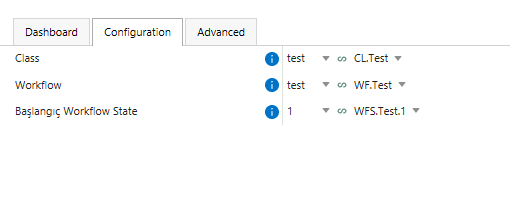
Configuration.cs

using System;
using System.Runtime.Serialization;
using MFiles.VAF.Configuration;

namespace PersonelDenemeVAF
{
    [DataContract]
    public class Configuration
    {
        [DataMember(Order = 1)]
        [MFClass(Required = true)]
        [JsonConfEditor(
            Label = "Class",
            HelpText = "Kullanılacak Class (Sınıf).",
            DefaultValue = "PersonelDenemeDegerlendirme")]
        public MFIdentifier Class { get; set; }
            = "PersonelDenemeDegerlendirme";

        [DataMember(Order = 2)]
        [MFWorkflow(Required = true)]
        [JsonConfEditor(
            Label = "Workflow",
            HelpText = "Nesneye atanacak Workflow.",
            DefaultValue = "PersonelDenemeWorkflow")]
        public MFIdentifier Workflow { get; set; }
            = "PersonelDenemeWorkflow";

        [DataMember(Order = 3)]
        [MFState(Required = true)]
        [JsonConfEditor(
            Label = "Başlangıç Workflow State",
            HelpText = "Yeni oluşturulan nesnenin başlangıç state'i.",
            DefaultValue = "PersonelDenemeWorkflow.Baslangic")]
        public MFIdentifier WorkflowState { get; set; }
            = "PersonelDenemeWorkflow.Baslangic";
    }
}
  

  • I don't know if anybody wants to hear this but your best bet is to ask google ai, post your code and your question there and get it fixed quickly.. But be careful and always use brain in conjunction ;) Otherwise study the docs and samples..

  • What do you mean by "open a document"?  The VAF runs on the server and has no UI.  What exactly do you want to achieve?

  • Currently, VBScript automatically opens documents or objects, but is this possible with VAF? In the VAF configuration section, can I enter the relevant class workflow and its state, and then automatically open a document or object when that state is reached? Also, the documentation for VAF in version 22.12 is limited; there's a possibility VBScript will be phased out in the future, so will the documentation increase then?

  • You want to check the document out and back in again?  What do you mean by open a document?

  • Dim oPersonelValues : Set oPersonelValues = Vault.ObjectPropertyOperations.GetProperty(objver, 3886).TypedValue.GetValueAsLookups()


    Dim oAcl : Set oAcl = Vault.NamedACLOperations.GetNamedACL(156).AccessControlList


    Dim i
    For i = 1 To oPersonelValues.Count
    Dim oPropertyValues : Set oPropertyValues = CreateObject("MFilesAPI.PropertyValues")
    Dim oPropertyValue : Set oPropertyValue = CreateObject("MFilesAPI.PropertyValue")

    ' Class = 343
    oPropertyValue.PropertyDef = MFBuiltInPropertyDefClass
    oPropertyValue.TypedValue.SetValue MFDatatypeLookup , 48
    oPropertyValues.Add -1 , oPropertyValue

    ' Workflow = 248
    oPropertyValue.PropertyDef = 38
    oPropertyValue.TypedValue.SetValue MFDatatypeLookup , 123
    oPropertyValues.Add -1 , oPropertyValue

    ' State = 1230
    oPropertyValue.PropertyDef = 39
    oPropertyValue.TypedValue.SetValue MFDatatypeLookup , 184
    oPropertyValues.Add -1 , oPropertyValue


    oPropertyValue.PropertyDef = 3886
    oPropertyValue.TypedValue.SetValue MFDatatypeMultiSelectLookup , oPersonelValues.Item(i).Item
    oPropertyValues.Add -1 , oPropertyValue


    Dim emptyFiles : Set emptyFiles = CreateObject("MFilesAPI.SourceObjectFiles")

    Vault.ObjectOperations.CreateNewObjectEx _
    125, _
    oPropertyValues, _
    emptyFiles, _
    False, _
    True, _
    oAcl


    Next How can I implement this VBScript structure using VAF?

  • So you want to create an object?

    Broadly: almost exactly the same.  The above just uses the COM API, which is what is available to you in the VAF.  The VAF has some wrappers/helpers for various situations, but the COM API underpins it all and you can use it.

    In the initial code snippet you included an event handler that did something very similar, as an event handler that ran after an object was created.  Did it work?  Did it have an error?  What exactly went wrong?

    Scheduling isn't something that the VAF itself does, but the free "VAF Extensions" library does it.  There is an example in the library readme: VAF.Extensions.Community/MFiles.VAF.Extensions at master · M-Files/VAF.Extensions.Community

  • When a user checked in in a class other than the one I specified, the VAF crashed and gave a warning: VaultScriptSessionTemplates.cpp, 392, Parameter incorrect. (Registry key names should not be greater than 255 characters.) (0x80070057)
    VaultScriptSessionTemplates.cpp, 691, Parameter incorrect. (Registry key names should not be greater than 255 characters.) (0x80070057)
    CoActiveScriptSite.cpp, 1863, Parameter incorrect. (Registry key names should not be greater than 255 characters.) (0x80070057)
    CoActiveScriptSite.cpp, 1370, Parameter incorrect. (Registry key names should not be greater than 255 characters.) (0x80070057)
    AfterCheckInChanges::PersonnelTrialVAF.MFEventHandlerAfterCheckInChanges, 1, Parameter is incorrect. (Registry key names should not be greater than 255 characters.) (0x80070057)

  • I haven't ever seen that error before.  A couple of comments about the code above:

    1. It uses a mix of old and new syntaxes; you do not need the config declaration on lines 12 and 13 (there will be a "this.Configuration" instance you can use).
    2. Having something that creates an object after an object is created scares me; will this just try to do it over and over again?  If you want to just try this out then you could either put the schedule in place now, or you could use the VAF Extensions to create a button in your dashboard which you click and run this method to test it out: VAF.Extensions.Community/MFiles.VAF.Extensions at master · M-Files/VAF.Extensions.Community
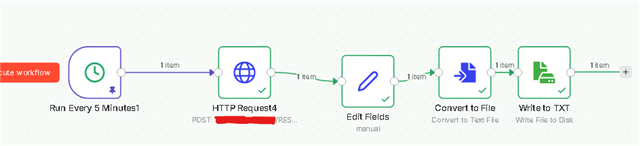
  • I'm not as experienced with VAFs as I am with VBScript, but as a workaround, I've set it to trigger automatically every day at 8:00 AM via the n8n REST API.

    If you could produce more documentation or content about VAF, it would be very helpful for us M-Files developers :)