M-Files Workspaces - Document Object Type Relation

Hey guys,

I've configured the relations of other object types to Document object type and it works.
However, when trying to add other objects types in Document OT, the change is saved (despite the warning you cannot modify built-in objects) but in the UI, when you open the Workspace for the document, the Object type tabs are empty.

Has anyone tried this? Is it even possible to open Workspace from Documents?
Example Supplier  OT - Workspace with visible documents
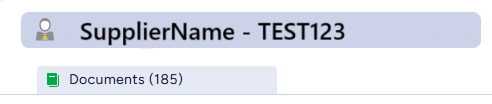
Example - Document OT - Workspace without visible Suppliers
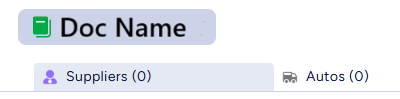
I've read the documentation available here Workspaces as well as the docs on the link provided in the article. Still couldn't find info about Documents.

Best Regards!

Parents
  • Currently, workspace tabs only display objects that directly reference the workspace object. In your case, this means the document would have to be listed on the Supplier’s metadata card. Most likely, the reference exists in the opposite direction, where the Supplier is tagged on the document’s metadata card.

    Next year, we'll enhance Workspaces to support relationships to both directions. These improvements should help resolve this scenario.

Reply
  • Currently, workspace tabs only display objects that directly reference the workspace object. In your case, this means the document would have to be listed on the Supplier’s metadata card. Most likely, the reference exists in the opposite direction, where the Supplier is tagged on the document’s metadata card.

    Next year, we'll enhance Workspaces to support relationships to both directions. These improvements should help resolve this scenario.

Children
No Data