


Hello!
I have a theoretical question here on how the Automatic permissions are working going into a workflow.
I have a Class Document that has automatic permissions enabled. Group A has full access, Group B can Edit, Group C can Read.
When creating a document it automatically enters a Workflow with 5 steps - Init - Submitting - 1st Approval - 2nd Approval - Final Document
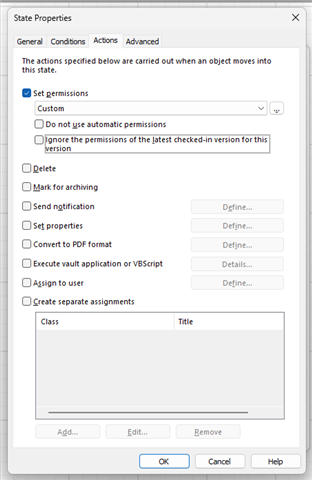
When creating the Document it has to land on 1st Level Approval and there I need to give access to Edit to the person selected in the metadata card of the Document so he can Approve. Then I go into the State Permissions and Set the permissions selecting through the metadata properties (pseudo users) and that is okay. My question is what will happen with the permissions from that point on, what is ths button "Do not use automatic permissions" and "Ignore the permissions of latest checked-in version for this version"? How their combination work? In the Custom fields do I have to set all the rest of the users that need access again or I can just add the new person for this state that can Edit?
Moving forward to Second Level Approval - I need to remove the Edit rights for the 1st person and allow Edit for the Second.
And then the document goes into a Final State where I all the perticipants in the process can read and only Group A and Group B can Edit.
That makes 3 questions in total:
1. What the buttons "Do not use automatic permissions" and "Ignore the permissions of latest checked-in version for this version" work alone and in combination
2. Do I have to set permissions for all steps in the workflow from zero or they will return to Automatic permssions automatically?
3. Is Automatic Permissions the best option for this use-case of M-Files?
Best,
Vasil


