This discussion has been locked.
You can no longer post new replies to this discussion. If you have a question you can start a new discussion

Miss Admin Setting tools

Since the upgrade to the new version M-Files Online (24.12.14341.6) the Admin setting tools disappeared however I could still access the Admin through other options. but now the Admin settings have disappeared. How do I recover from this? Please help

  • Do you mean the M-Files Admin 'application'?

    or:

    If that is no longer available, I'd suggest downloading the 24.12 full installation package: https://m-files.com/download

    Running that you can select "Modify", then tick the M-Files Server Tools box.

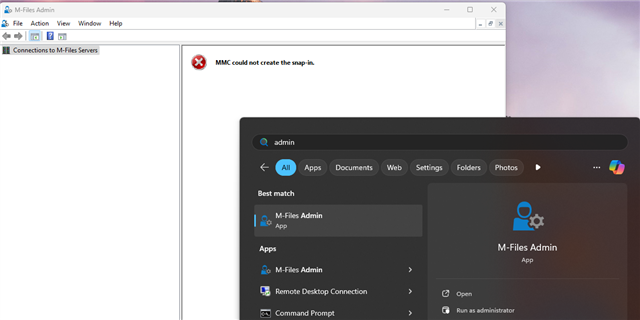
  • I guess he means this one;

    When you frequently use admin panel and upgrade a while after it, the shortcut gets stuck on windows search menu. The first option Windows offers is the old one that ends up being MMC can't load M-Files snap-in as that link goes and looks up for it in older version folders.

    However, if the user goes for second link in the screenshot, that is the link to current version and it will launch properly