


Hi All, so i have been coming across this quite often, when making changes to the M-Files web server Example (Changing from Classic to New web)
The specified CGI application encountered an error and the server terminated the process.
This is all that displays on the new web page, a bunch of troubleshooting, i see there is a GIG feature that can be installed in roles and features on windows server.
normally when you set up a new M-files web server via M-Files it creates the applicaiton pools and defult site should you leave it as that, but when changing it i suddenly get this issue.
the route cause is that C:\Program Files\M-Files\Server\Bin\MFWA.exe (MFWA.exe) is missing
As i understand it the M-Files application pools need to be set as "no managed code" but its hard to belive as M-Files classic worked just fine with .net v4
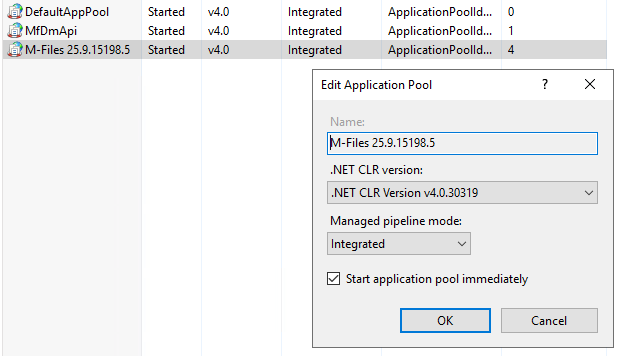
If i look at my defult application pools they are all set as defult below.
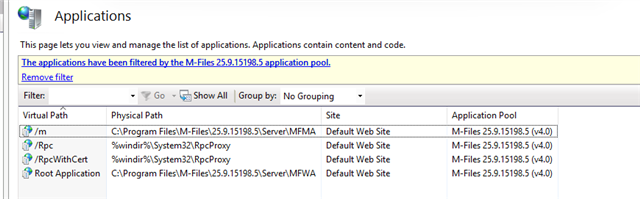
So my question is really where has the MFWA.exe gone after i tried to enable the new m-files web? I mean all the defaults point to it being there. Yes i have checked AV and all that.
I also restored to a IIS backup to a time when i made the first chance and cannot find the MFWA file.
I have tried this and dont get anywhere.
-
CGI module missing → Install via Server Manager or
Install-WindowsFeature Web-CGI. -
MFWA.exe missing → Reinstall or repair M-Files Web Access.
-
Handler missing → Add it in IIS:
| Request Path | Module | Executable | Name |
|---|---|---|---|
| MFWA.exe | CgiModule | C:\Program Files\M-Files\Server\Bin\MFWA.exe | M-Files Web Access Handler |
Kind Regards


