This discussion has been locked.
You can no longer post new replies to this discussion. If you have a question you can start a new discussion

Cannot see code for Calculated value (VBScript)

Hello,

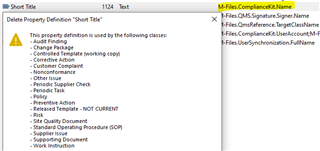
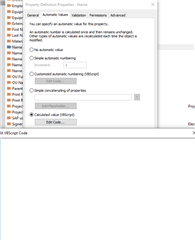
There is a property called "Name" with alias "M-Files.ComplianceKit.Name", and it's value is Calculated Value (VBScript), however in the property definition the code is completely empty. I would like to change it a bit, since it's causing problems with naming Change Requests, as it forces the Change Request number into the name of the SOP document. Where can I find the code for this property?
Parents Reply Children
  • Hmm yes this does seem like the same property, just renamed in our case. What would happen if I were to disable the calculated value in the property? It would probably stop generating the name by itself and I would have to reconfigure it manually? Or are properties like these controlled by the compliance kit in the backend code somehow?

  • As far as I understand in the QMS template this property is expected to be filled by the user, so it doesn't get an automatic value. The user-defined value is used in some automatically calculated values in other properties with Managed Properties.

    If it seems to get some value automatically in your vault and there's no Managed Property rule for it, then you should check the event handlers like sweise suggested.

  • Still havent found the code anywhere, but I did turn off the calculated value and set it as it was originally in the QMS template (on the Test version ofcourse) and so far I did not notice any issues. So I think that this was the issue, property wasn't supposed to be a calculated value at all