This discussion has been locked.
You can no longer post new replies to this discussion. If you have a question you can start a new discussion

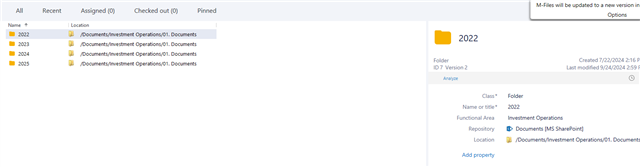
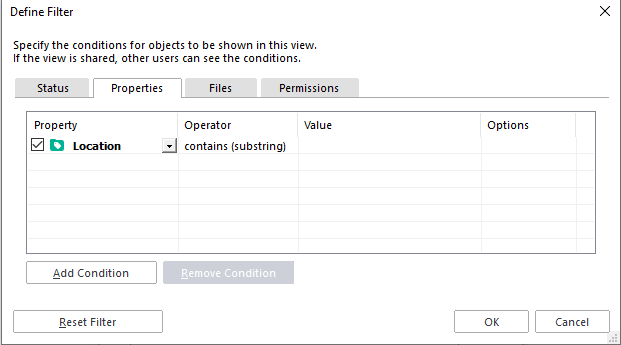
For those of us using the SharePoint connector as part of our implementation, is there a way to filter by unmanaged objects? I am also having difficulty accessing the "Location" property when building views on folders that are being managed by M-

Hi,

We are a start-up and new M-Files client. As part of our implementation, it was determined that the best course of action would be to just promote documents one-by-one from SharePoint (using the connector) into M-Files. Folder objects were created to help assist with this effort. We have now promoted all of the folders, but are struggling with a few things:

  1. Is it possible to create views that filter based on SharePoint location? The property seems to exist on managed folder objects, but I can't seem to filter on this system property.
  2. Ideally, we would like to create a queue of documents that are pending promotion from SharePoint to M-Files. Is there a way to create a view that only shows unmanaged objects? Or filters out managed ones? Or is our best best to just create an "Unclassified" class, get everything into M-Files, and then manage the queue from there?

Any help is much appreciated - thanks!

  • Views are basically metadata searches into M-Files and unmanaged objects don't yet have any metadata so unfortunately it's not possible to display unmanaged objects in views. For unmanaged objects, only the file contents is indexed and you can find them with quick search but not in views until they are promoted to managed objects.

    If you want to read more about unmanaged and managed objects in external repositories, refer to the user guide and Intelligent Metadata Layer Overview.

  • You can use the External View showing SharePoint documents. In that view you can add Class as a column and then sort by Class. This will not hide managed files but at list you will be able to gather all unmanaged documents in one section of your view. That should make your task a bit easier.

  • Thank you all so much; I appreciate the quick reply. We will develop a workaround based on the limitations on external views.

    Finally, to address my other question, is there any reason that the "Location" property is not accessible via M-Files views, even once a document or object has been promoted? Ideally, we would be able to use this string (or substrings) as a filter for certain views. For whatever reason, nothing we do seems to work here.

    Thanks!

  • Location is a special built-in property that doesn't behave like normal properties in all aspects. You should be able to copy the path from the Location field to a separate text property and then use that text property in your view filter.

    For instance Property Calculator should be able to do the copy operation, but I think you would need to somehow touch each Folder object to have the value copied. Your M-Files reseller also has access to some consulting tools that would help to do this as a mass operation.