External ID - Already exists error. How to find and free IDs?

Hello M-Files gurus,

I'm trying to update incorrect Customer external ID:s with "obj.Vault.ObjectOperations.SetExternalID(obj.ObjID, externalID);". Some objects allow this but a decent amount of objects give an error message that the ID already exists. However there are no duplicate ID:s, existing or deleted, in customer objects. I can only find corresponding ID:s in projects and documents.

I've run scheduled optimization.

Where could these duplicates be? Shouldn't duplicate IDs in different object types be fine? How can I free the (external) IDs for use again?


For example, Customer object with an ID of 2037 can't be seen anywhere in the vault (including deleted view) with sys admin permissions, yet M-Files Client throws this error:
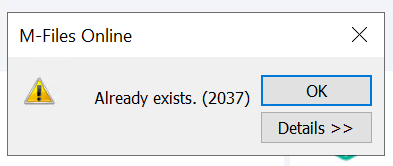


<MetadataEditor>, -, Script execution failed. ((BeforeCheckInChangesFinalize::VAFDocs.MFEventHandlerBeforeCheckInChangesFinalize: 101-4252-9)) (0x800408BB)

Parents
  • I was getting this error when another script gets accidently triggered or when I tried to update it twice. I also got it when I tried to update a checked-out object..

    If the error is the same error with the screenshot you should look for ID 4252 and find a pattern. in that error, 101 is object ID, 4252 that records ID and 9 is the version.

    IF you want to see internal ID's of the objects, you can create a property and have %INTERNALID% on auto-calculated section. If you add this to your object and recalculate it, it will show internal ID's on metadata card which would make things more visible

Reply
  • I was getting this error when another script gets accidently triggered or when I tried to update it twice. I also got it when I tried to update a checked-out object..

    If the error is the same error with the screenshot you should look for ID 4252 and find a pattern. in that error, 101 is object ID, 4252 that records ID and 9 is the version.

    IF you want to see internal ID's of the objects, you can create a property and have %INTERNALID% on auto-calculated section. If you add this to your object and recalculate it, it will show internal ID's on metadata card which would make things more visible

Children