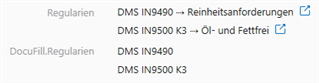
I read a lot of threads with similar problems but I think no one asked about this case?
The script should run as a Auto Calculated Value on the Multi Select Property which is based on a Text List.. Can you get me started?
I read a lot of threads with similar problems but I think no one asked about this case?
The script should run as a Auto Calculated Value on the Multi Select Property which is based on a Text List.. Can you get me started?
Could you please clarify a bit? I do not understand what you mean by a "Multiselect Property (Text list)"?
You can have a multiline text property allowing you to add more than one line of text. Is that what you mean?
If yes, then it seems like the goal is to get the displayvalues from all of the lookup items in your multiselect property, right?
It should be fairly simple to get the propertyvalue from the multiselect property as lookups and then loop through each of those lookups to get the DisplayValue from each of them while adding that text string to a variable. When the loop is completed you have all the text strings gathered in your variable, and you can use that as output. You can probable add a new line character as well after each added displayvalue to make the result look good.
With multiselect property (text list) I mean a multi select property which is based of a non object value list. A multi line text property doesn't do the job cause I want to be able to add a single item from the list to a word or excel document which doesn't work out of the box for a document lookup. So in short I want to mirror a multi select property containing documents to a multi select property containing text values.
This should act as a workaround for my problem described in the following thread (second problem, last post..):
I can loop through the multi select lookup and collect the elements but I cannot put them in the second lookup cause it is a different data type..
This is the code I thought I could use for it but I think the problem is that one lookup is object based and the other based on a text value list and so I need to do some conversion to make it work, that's my problem..
Dim oLookup : Set oLookup = CreateObject("MFilesAPI.Lookup")
Dim oLookups : Set oLookups = CreateObject("MFilesAPI.Lookups")
Dim oAdd
Dim oLookups1: Set oLookups1 = PropertyValues.SearchForPropertyByAlias(Vault, "PD.ZugehoerigeObjekte", True).TypedValue.GetValueAsLookups
For Each oLookup In oLookups1
oAdd = 1
For Each oLookup1 in oLookups
If oLookup1.DisplayValue = oLookup.DisplayValue Then
oAdd = 0
Exit For
End If
Next
If oAdd = 1 Then
oLookups.Add -1, oLookup
End If
Next
Output = oLookups
I do not think that such a solution would be practical in your case, because in practice this means that a list of values must be created dynamically for each document. This speaks of a problem with architecture, as Bright-Idias pointed out in the quoted post. As a workaround, I can suggest the use of multi-line text to be used in the template.
The code for this must be something like this:
'Get instance of current object properties
Dim oPropVals: Set oPropVals = CreateObject("MFilesApi.PropertyValues")
Set oPropVals = Vault.ObjectPropertyOperations.GetProperties(ObjVer)
'Get property IDbyAliase
Dim iPDZugehoerigeObjekte : iPDZugehoerigeObjekte = Vault.PropertyDefOperations.GetPropertyDefIDByAlias("PD.ZugehoerigeObjekte")
'Get chosen items as text
szPDZugehoerigeObjekte = oPropVals.SearchForProperty(iPDZugehoerigeObjekte).TypedValue.DisplayValue
'Splitting by ;
arrPDZugehoerigeObjekte = Split (szPDZugehoerigeObjekte, ";")
'Convert Array to multiline string
For i = 0 To UBound(arrPDZugehoerigeObjekte)
szPDTemplateZugehoerigeObjekte = szPDTemplateZugehoerigeObjekte & i + 1 & ". " & arrPDZugehoerigeObjekte (i) & vbCrLf
Next
'Remove Extra new line
If Len (szPDTemplateZugehoerigeObjekte) > 0 Then
szPDTemplateZugehoerigeObjekte = Left (szPDTemplateZugehoerigeObjekte, Len(szPDTemplateZugehoerigeObjekte) - 1)
End If
OUTPUT = szPDTemplateZugehoerigeObjekte
This, of course, would only allow placing each selected value on a separate line
Hi Ne0Tr0n, I think my Idea could work, cause it would bei the same shared list for every object.. Only problem i see is that this list could get really long but i will see If it affects performance.. Maybe i have to state that i'm building a vault with Only one object type (Document but renaimed to Object). I think class groups and properties are enough for differencing objects and this approach gives me a lot of extra flexibility.. Can you help again with the solution i mentioned? Thank you very much!
Got it working, here's the code
Dim PropertyValues : Set PropertyValues = Vault.ObjectPropertyOperations.GetProperties(ObjVer)
Dim oLookups1 : Set oLookups1 = PropertyValues.SearchForPropertyByAlias(Vault, "PD.ZugehoerigeObjekte", True).TypedValue.GetValueAsLookups
Dim oLookup1 : Set oLookup1 = CreateObject("MFilesAPI.Lookup")
Dim oLookups2 : Set oLookups2 = CreateObject("MFilesAPI.Lookups")
Dim oLookup2 : Set oLookup2 = CreateObject("MFilesAPI.Lookup")
Dim iValueListID : iValueListID = 127
Dim oValueListItems : Set oValueListItems = Vault.ValueListItemOperations.GetValueListItems(iValueListID)
Dim oValueListItem
Dim oAdd
Dim oItem
For Each oLookup1 In oLookups1
oAdd = 1
For Each oItem in oValueListItems
If oItem.Name = oLookup1.DisplayValue Then
oAdd = 0
End If
Next
If oAdd = 1 Then
Set oValueListItem = CreateObject("MFilesAPI.ValueListItem")
oValueListItem.Name = oLookup1.DisplayValue
Vault.ValueListItemOperations.AddValueListItem iValueListID, oValueListItem, False
End If
oAdd = 1
For Each oLookup2 in oLookups2
If oLookup2.DisplayValue = oLookup1.DisplayValue Then
oAdd = 0
Exit For
End If
Next
If oAdd = 1 Then
Dim oSearchCondition : Set oSearchCondition = CreateObject("MFilesAPI.SearchCondition")
Dim oSearchConditions : Set oSearchConditions = CreateObject("MFilesAPI.SearchConditions")
oSearchCondition.Expression.SetValueListItemExpression 2, 0, Nothing
oSearchCondition.ConditionType = 1
oSearchCondition.TypedValue.SetValue 1, oLookup1.DisplayValue
oSearchConditions.Add -1, oSearchCondition
oSearchCondition.Expression.SetValueListItemExpression 5, 0, Nothing
oSearchCondition.ConditionType = MFConditionTypeEqual
oSearchCondition.TypedValue.SetValue MFDatatypeBoolean, false
oSearchConditions.Add -1, oSearchCondition
Dim oSearchResults : Set oSearchResults = Vault.ValueListItemOperations.SearchForValueListItemsEx(iValueListID, oSearchConditions, True, 0, True)
Dim oSearchResult
Dim NewLookup : Set NewLookup = CreateObject("MFilesAPI.Lookup")
For Each oSearchResult In oSearchResults
NewLookup.Item = oSearchResult.ID
NewLookup.SetLatestVersion
oLookups2.Add -1, NewLookup
Next
End If
Next
Dim oPropertyValue : Set oPropertyValue = CreateObject("MFilesAPI.PropertyValue")
oPropertyValue.TypedValue.SetValueToMultiSelectLookup(oLookups2)
oPropertyValue.PropertyDef = Vault.PropertyDefOperations.GetPropertyDefIDByAlias("PD.ZugehrigeObjektedocufill")
Call Vault.ObjectPropertyOperations.SetProperty(ObjVer, oPropertyValue)And here's the code for writing a specific property (in this case "PD.Bezeichnung") of the Object Lookup into the Text Lookup..

Dim PropertyValues : Set PropertyValues = Vault.ObjectPropertyOperations.GetProperties(ObjVer)
Dim oLookups1 : Set oLookups1 = PropertyValues.SearchForPropertyByAlias(Vault, "PD.ZugehoerigeObjekte", True).TypedValue.GetValueAsLookups
Dim oLookup1 : Set oLookup1 = CreateObject("MFilesAPI.Lookup")
Dim oLookups2 : Set oLookups2 = CreateObject("MFilesAPI.Lookups")
Dim oLookup2 : Set oLookup2 = CreateObject("MFilesAPI.Lookup")
Dim iValueListID : iValueListID = 127
Dim oValueListItems : Set oValueListItems = Vault.ValueListItemOperations.GetValueListItems(iValueListID)
Dim oValueListItem
Dim oAdd
Dim oItem
Dim oObjId : Set oObjId = CreateObject("MFilesAPI.ObjID")
Dim oObjVerAndProps
Dim oBezeichnung
For Each oLookup1 In oLookups1
Call oObjId.SetIDs(oLookup1.ObjectType, oLookup1.Item)
Set oObjVerAndProps = vault.ObjectOperations.GetLatestObjectVersionAndProperties(oObjId, true)
oBezeichnung = oObjVerAndProps.Properties.SearchForPropertyByAlias(Vault, "PD.Bezeichnung", True).TypedValue.DisplayValue
oAdd = 1
For Each oItem in oValueListItems
If oItem.Name = oBezeichnung Then
oAdd = 0
End If
Next
If oAdd = 1 Then
Set oValueListItem = CreateObject("MFilesAPI.ValueListItem")
oValueListItem.Name = oBezeichnung
Vault.ValueListItemOperations.AddValueListItem iValueListID, oValueListItem, False
End If
oAdd = 1
For Each oLookup2 in oLookups2
If oLookup2.DisplayValue = oBezeichnung Then
oAdd = 0
Exit For
End If
Next
If oAdd = 1 Then
Dim oSearchCondition : Set oSearchCondition = CreateObject("MFilesAPI.SearchCondition")
Dim oSearchConditions : Set oSearchConditions = CreateObject("MFilesAPI.SearchConditions")
oSearchCondition.Expression.SetValueListItemExpression 2, 0, Nothing
oSearchCondition.ConditionType = 1
oSearchCondition.TypedValue.SetValue 1, oBezeichnung
oSearchConditions.Add -1, oSearchCondition
oSearchCondition.Expression.SetValueListItemExpression 5, 0, Nothing
oSearchCondition.ConditionType = MFConditionTypeEqual
oSearchCondition.TypedValue.SetValue MFDatatypeBoolean, false
oSearchConditions.Add -1, oSearchCondition
Dim oSearchResults : Set oSearchResults = Vault.ValueListItemOperations.SearchForValueListItemsEx(iValueListID, oSearchConditions, True, 0, True)
Dim oSearchResult
Dim NewLookup : Set NewLookup = CreateObject("MFilesAPI.Lookup")
For Each oSearchResult In oSearchResults
NewLookup.Item = oSearchResult.ID
NewLookup.SetLatestVersion
oLookups2.Add -1, NewLookup
Next
End If
Next
Dim oPropertyValue : Set oPropertyValue = CreateObject("MFilesAPI.PropertyValue")
oPropertyValue.TypedValue.SetValueToMultiSelectLookup(oLookups2)
oPropertyValue.PropertyDef = Vault.PropertyDefOperations.GetPropertyDefIDByAlias("PD.ZugehrigeObjektedocufill")
Call Vault.ObjectPropertyOperations.SetProperty(ObjVer, oPropertyValue)
Β© 2025 M-Files, All Rights Reserved.