This discussion has been locked.
You can no longer post new replies to this discussion. If you have a question you can start a new discussion

M-Files COM Error: Network problems are preventing M-Files from communicating with the server. The RPC Server is unavailable

Hello All, 

I have tried every permutation of the following code I can think of and it just will not connect.  The Desktop Application connects fine with all the same settings.

Here is one permutation of the code:
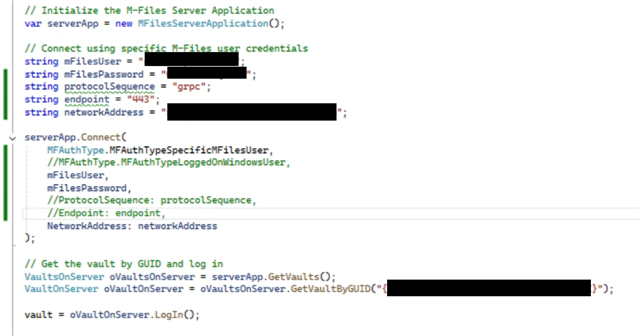
and here is the error.
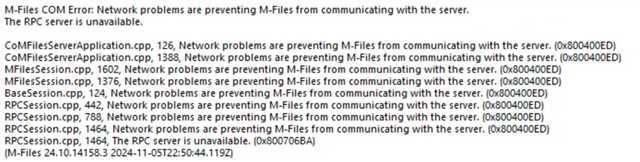
Any suggestions on what is going on?

Thanks!

Pat

  • Is this a cloud vault or on-prem?

    I hate to be that person but this is typically an issue with the port or network address provided - have you double-checked those against M-Files client running on the same machine? 

  • In addition to what Craig said when it comes to the gRPC protocol:
    1. the default communication port is 7766, not 443. This may be the case if it is through a reverse proxy or in the cloud
    2. There must be a valid SSL certificate installed on the server (and on the proxy if such is the architecture), which the client can trust.
    If these conditions are not met, it is normal to return the above error

  • Hello Craig and thanks for the response.  This is a cloud vault and I have verified the network address.  I have tried both the ip address and the name. 

  • Hello Ne0Tr0n.  This is a cloud vault so I assumed the SSL cert was handled by M-Files?

  • I'm going to ask the stupid question again (sorry): are you testing this running on the same machine as the client connection that works?

    There is no functional difference, at least in theory, between doing this via code and the M-Files client connection.  If this is being tested on the same machine then there should be no firewall considerations.

    What is the protocol and port configured within your M-Files client connection, and what value have you tried in the code?

  • If this is a cloud vault then we can get rid of most of the technical considerations, as well as firewalls and things, as they are managed online.

    I just checked here and I believe the protocol sequence should be the string "grpc" and endpoint the string "443":

    var serverApplication = new MFilesAPI.MFilesServerApplication();
    var connectionData = new ConnectionData()
    {
    	NetworkAddress = "myvault.cloudvault.m-files.com",
    	ProtocolSequence = "grpc",
    	Endpoint = "443"
    };
    serverApplication.ConnectAdministrativeEx5(connectionData, MFAuthType.MFAuthTypeSpecificMFilesUser, "MyUsername", "MyPassword");

  • Thanks Craig and Ne0Tr0n, I added the following cast and it worked before I tried the method you recommended

    I appreciate the help!
