


Dear Customers,
In our ongoing dedication to constant enhancement and ensuring optimal performance of our solution, we're thrilled to unveil the latest round of product updates.
**Jan 5th update** A new service release available for download.
We have released a new version of the M-Files client to improve backwards compatibility for the new Workspaces feature, and especially its Customizable Tabs functionality. The version 25.12.15491.11 is now available through Downloads, and will also be released to clients via the auto-updates later today. For all changes, please visit the Release Notes.
Please note the update schedule: maintenance break already on Dec 14th. For full schedule, please see M-Files Online update schedule.
Upgrading to the new M-Files Desktop experience
The new M-Files Desktop is the primary focus for all future features and is the recommended client moving forward. Transitioning requires the use of the gRPC protocol. While gRPC is enabled by default in our cloud offering, on-premises customers need to take certain steps to enable it. Please read How to transition to the new M-Files Desktop to help assess your environment and to find easiest path to transition.
New Features and Enhancement highlights to M-Files Online:
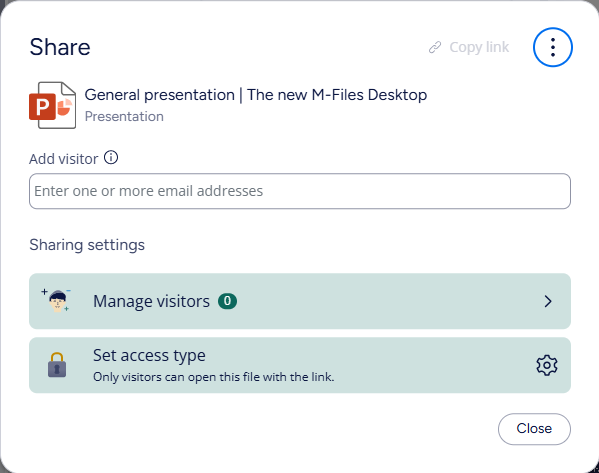
- M-Files Sharing Center. Sharing Center introduces a new centralized sharing for external collaboration in the new M-Files Desktop and Web. It offers a unified interface for sharing, tracking, and managing access. This initial release introduces capability to create Visitor Links with the new M-Files clients.Read more: M-Files Sharing Center.
- Workspaces update: Customizable tabs. Users can now create, edit, hide, rename, and delete their own workspace tabs for a personalized experience. Administrators can also create common tabs for all users to ensure consistency across the organization. Read more: M-Files Workspaces.
- Workspaces improvement: Pinned Primary Object Views. Administrators can now pin views for key object types directly to the main menu in the new M-Files Desktop and Web clients. These pinned views are designed to help end users quickly locate important objects and access their workspaces. Read more: M-Files Workspaces.
- Desktop Co-authoring improvement: Version editors. A new built-in Version editors property is introduced to show who edited or co-authored each document version. This improves compliance and auditability for desktop co-authoring scenarios.
- Replication Note: Please note that in this initial phase replication packages do not contain the new built-in property to ensure compatibility when replicating to older vaults.
- Please note: The property will be present regardless of co-authoring usage.
- Read more: Desktop Co-Authoring in M-Files
- View management improvements. Administrators can enable a feature that shows the number of objects inside virtual folders in views. Additionally, users can now filter views using custom access control lists (ACLs), ensuring they only see objects they have permission to access.
- Automatic logout improvement: concurrent licenses in Web. Optimize license utilization and improve security through inactivity detection. User interaction events, such as mouse clicks, movements and keyboard presses keep the session alive. If no user interaction is detected, client will perform a logout request and redirect to login page.
- To see all the changes, please visit M-Files Release Notes.
For other improvements brought to the new clients, please visit Latest enhancements in the new M-Files Desktop. For the schedule for the monthly releases and maintenance breaks, please see M-Files Online update schedule.
Release Details:
Product: M-Files
Version Number: 25.12.15491.7
Cloud Update Schedule: Dec 14, 2025
Download Availability: Dec 17, 2025
Access our full release notes: Release Notes
Download: M-Files Downloads


